Ayin light agents can modify fields as well as solve, mark as pending, or place a hold on tickets using macros at the bottom of any ticket. Below are the options available for light agents to modify specific ticket fields.
Solve, Pend, or Hold a Ticket
- Select the appropriate action from the macro list.
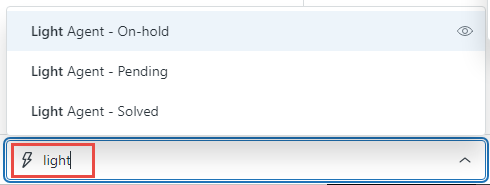
- After selecting your macros, YOU MUST submit the ticket using the action button in the bottom right. The updates to the ticket will occur immediately after submission.
Department Light Agent Workflows
- Some departments have specific light agent macro driven workflows:
Light Agent Capabilities
Light agents are Ayin caregivers who need to use Zendesk but do not have a business need to interact directly with external users. In general, light agents can modify specific ticket fields using the macros provided but have limited interaction with external users.
Light Agent Capability Matrix
| Area |
Light agents can... |
Light agents can't... |
| Tickets |
- View either tickets assigned to groups they're in or view all tickets. For details, see Updating reporting and ticket permissions for light agents.
- Make private comments.
- Be the ticket requester.
- Edit ticket properties at the time of ticket creation.
- Be CC'ed on tickets.
- Create tickets on behalf of end-users. However, the end-user won't be able to see it until another agent adds a public comment.
- Edit ticket properties for tickets they're requesters on after the ticket is created.
|
- Make public comments.
- Be assigned to tickets.
|
| People |
|
- Edit user profiles.
- Assume a user's identity.
- Change a user's password.
- Browse or search for users.
|
|
Help Center
|
- View areas of the Help Center knowledge base and community that are restricted to agents
(Optional) Add and edit articles and posts in certain knowledge base sections and community topics Note: This option is set at the section level in the knowledge base and at the topic level in the community.
- For more information, see the Help Center viewer section.
|
- Cannot be a Help Center manager.
|
| Reports |
- Either view or have no access to reports. For details, see Updating reporting and ticket permissions for light agents.
|
|
| Views |
|
|
|
Business Rules
|
|
- Create, view, or edit macros, automations, or triggers.
- Be used as conditions in business rules. For example, you can't create a trigger that emails the agent assigned to the ticket when a user who is a light agent comments on it.
|
| Channels |
|
- Respond to chats or calls.
- Manage channels.
|
|
Mail API
|
|
- Respond to notifications or create new tickets.
|
